SELL EVERYWHERE
FROM ONE POS.
The all-in-one cloud-based POS built for South African retailers — sync your physical store with Takealot, Shopify, and Amazon.
Trusted by South African businesses
Everything You Need to Run Your Business
A complete cloud-based point-of-sale system with inventory, sales, quotes and reports — all of it in your browser, on the shop counter or on your phone.
Core Feature
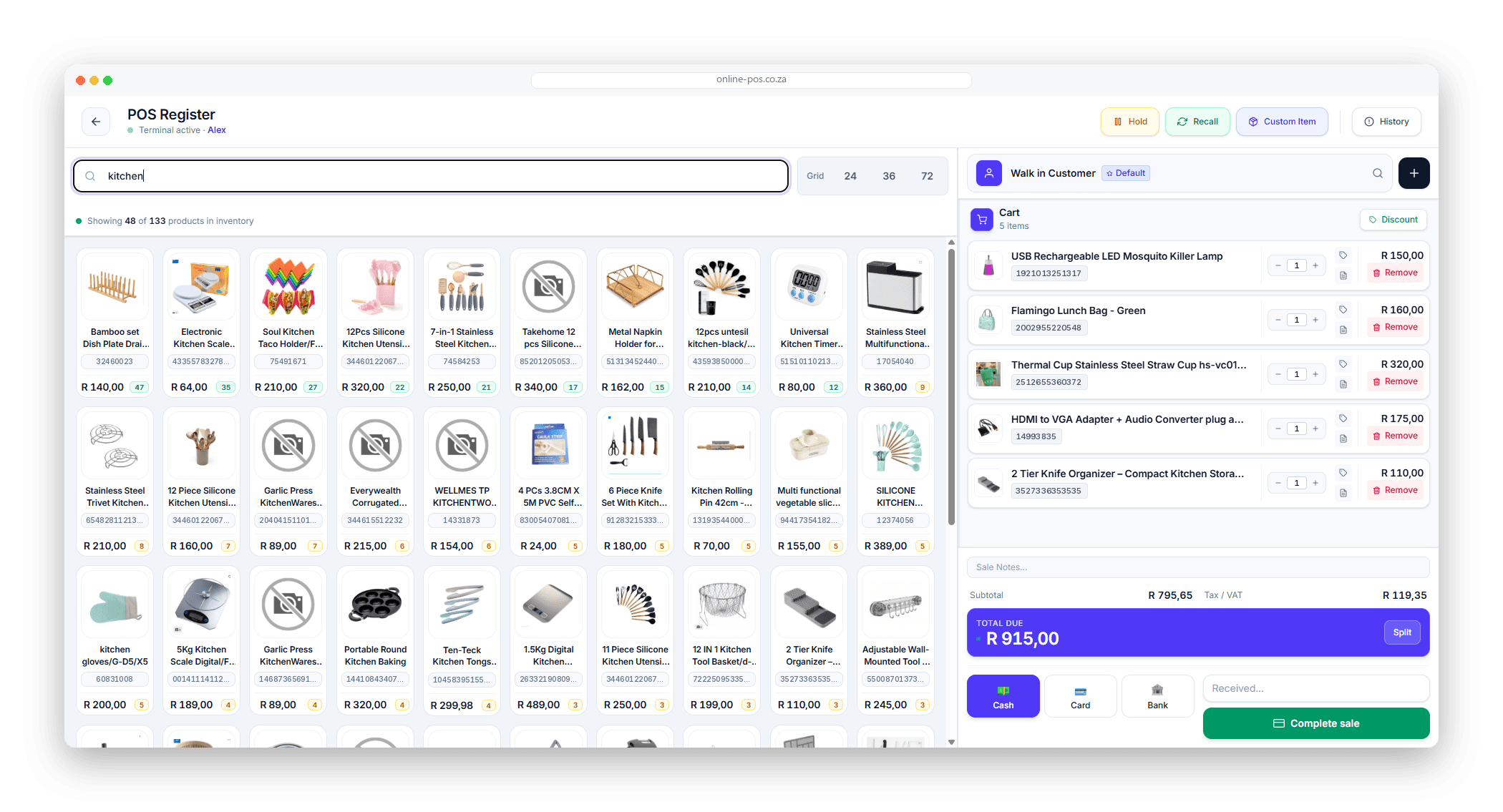
POS Register
Search the catalogue or scan a barcode — the product is in the cart instantly
Take cash, card or bank transfer, or split one sale across several methods
Hold a sale and recall it later when the customer comes back to the till
Add a custom item on the spot for anything not in your catalogue
Serve a walk-in, or attach the sale to a customer and keep their history
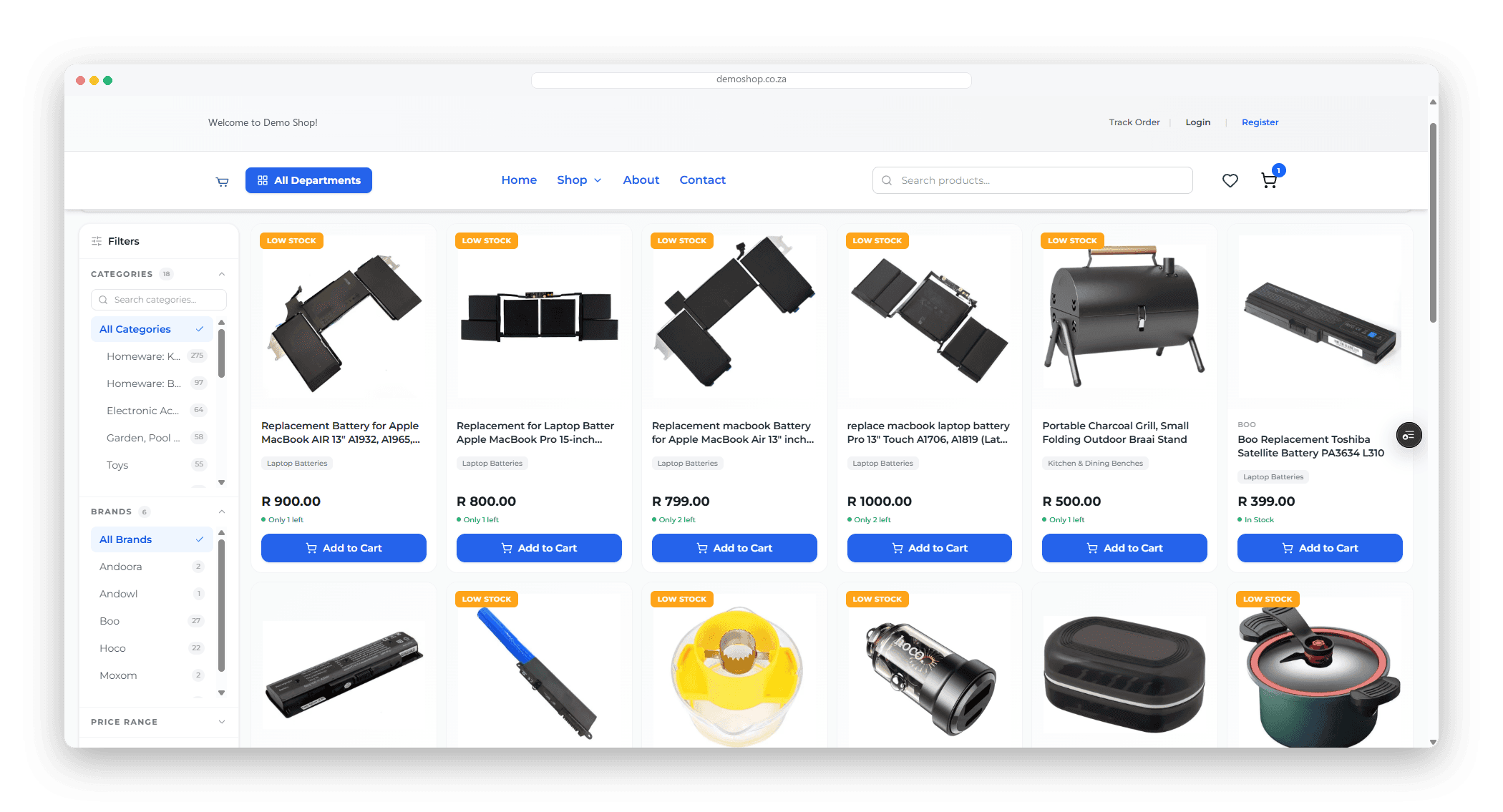
Your Own Online Store, Built Into the POS
Not a separate platform you have to keep in step with the shop. It is the same catalogue, the same stock and the same customers as the register — published on your own domain and open to the public.
Your own domain
Run the store on your own domain, or on a free address we give you on sign-up. Extra domains you already own redirect to the main one, so you never split your traffic.
Design it without a designer
Upload your logo, pick a layout and switch the whole colour palette with one click from a set of ready-made presets. Every look you save can be rolled back, so nothing you try is permanent.
Checkout that actually collects
Card payments through PayFast, plus your own delivery and collection options priced per area. Shoppers can check out as guests or keep an account with their full order history.
Or open it up to other sellers
Switch to the marketplace layout and other vendors can list on your store, manage their own products from a vendor portal, and get paid out on your terms.
What comes with every store
One catalogue — a product added at the till is on the store immediately
Stock counts down live, so nothing oversells while you are serving in-store
Blog, FAQ, about and contact pages you edit yourself
Shipping, returns, refund and privacy policy pages built in
Customer reviews and questions on every product
Order tracking page your customers can use without phoning you
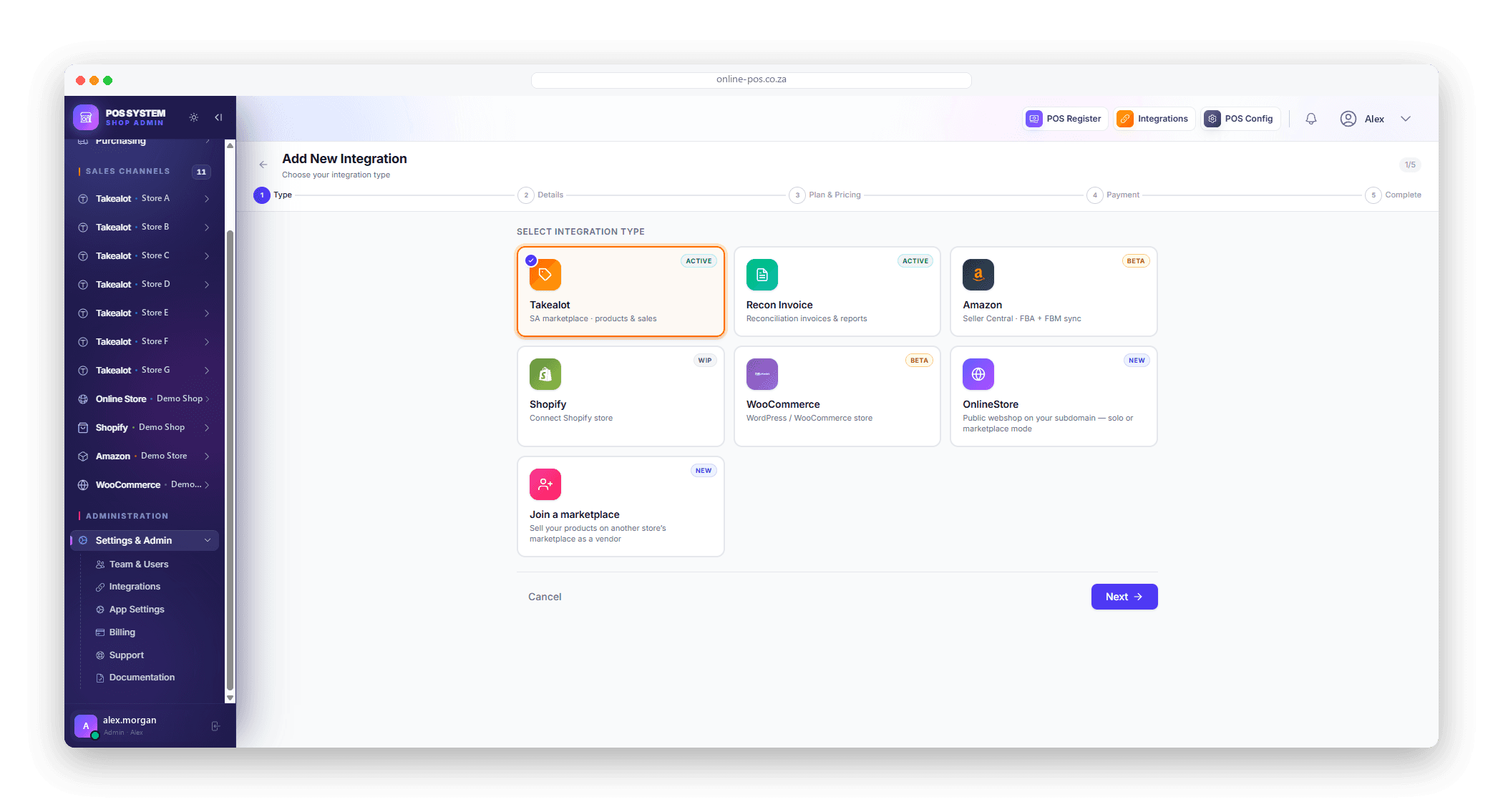
Sell on Every Channel
One catalogue behind all of them. Sell an item at the counter and the stock drops on Takealot, on your Shopify store and on your own website — without you touching any of them. One admin can run several accounts on the same channel, so three Shopify stores are three connections, not three logins.
The Same System, Open in Your Phone's Browser
Type in the same web address you use at the counter and the screen rearranges itself for a phone. Same login, same catalogue, same live figures — so you can take a sale, check a price or count stock from the storeroom, a market stall or a customer's driveway. It is a true mPOS — a mobile point of sale — with no app to install.
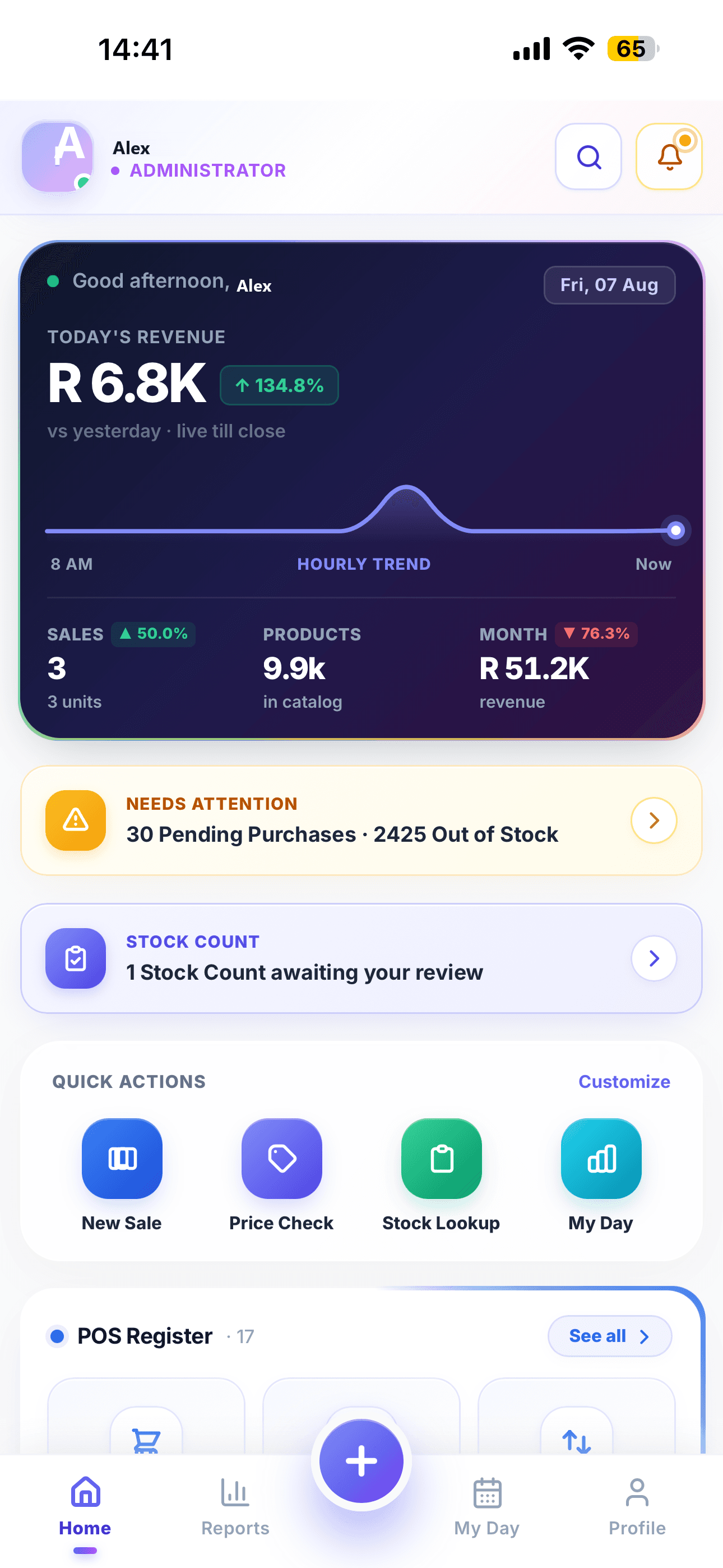
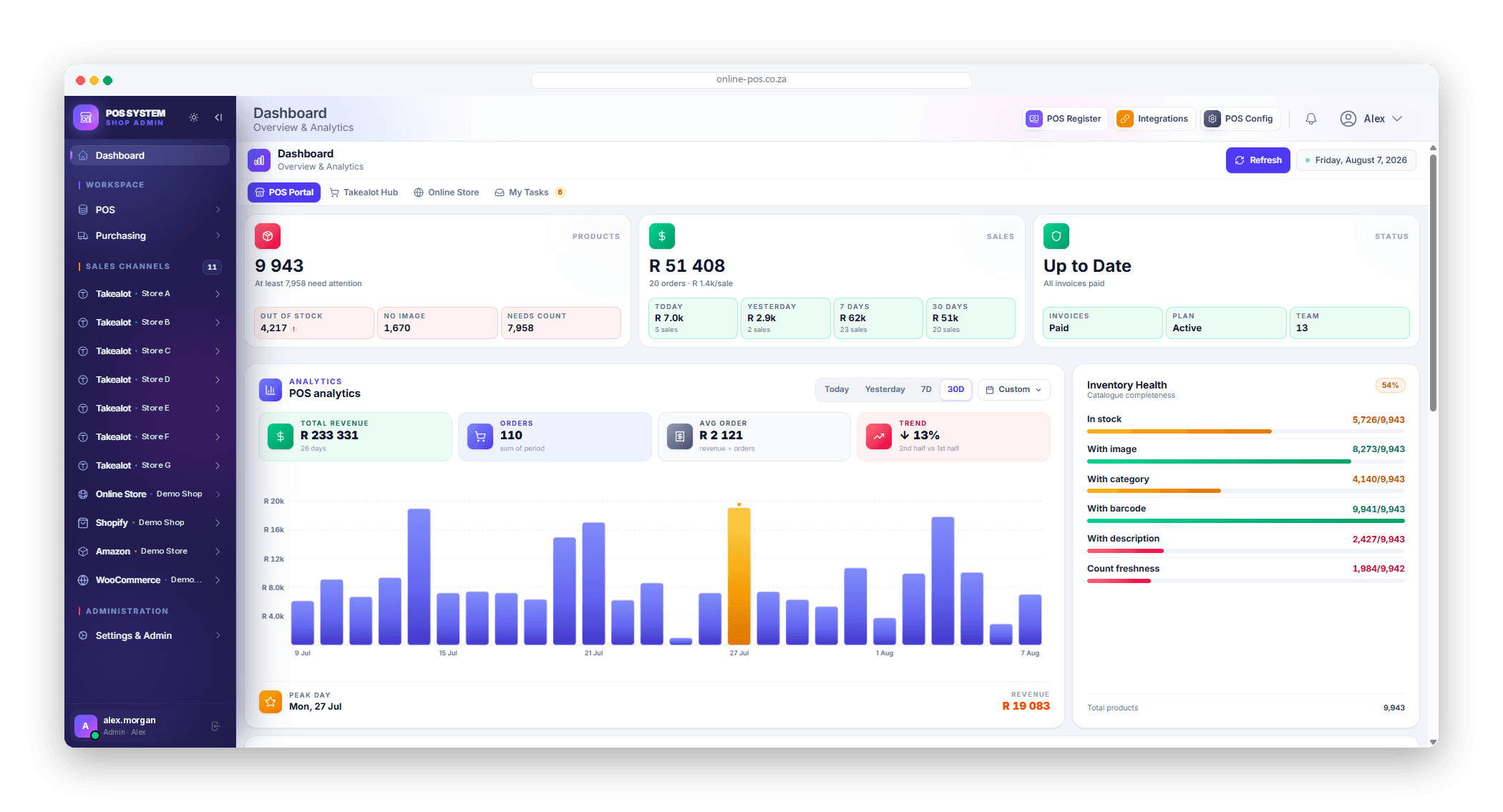
Today's takings, live
Revenue so far today against yesterday, the hourly trend, and what needs attention — pending purchases, out-of-stock lines and any stock count waiting on you.
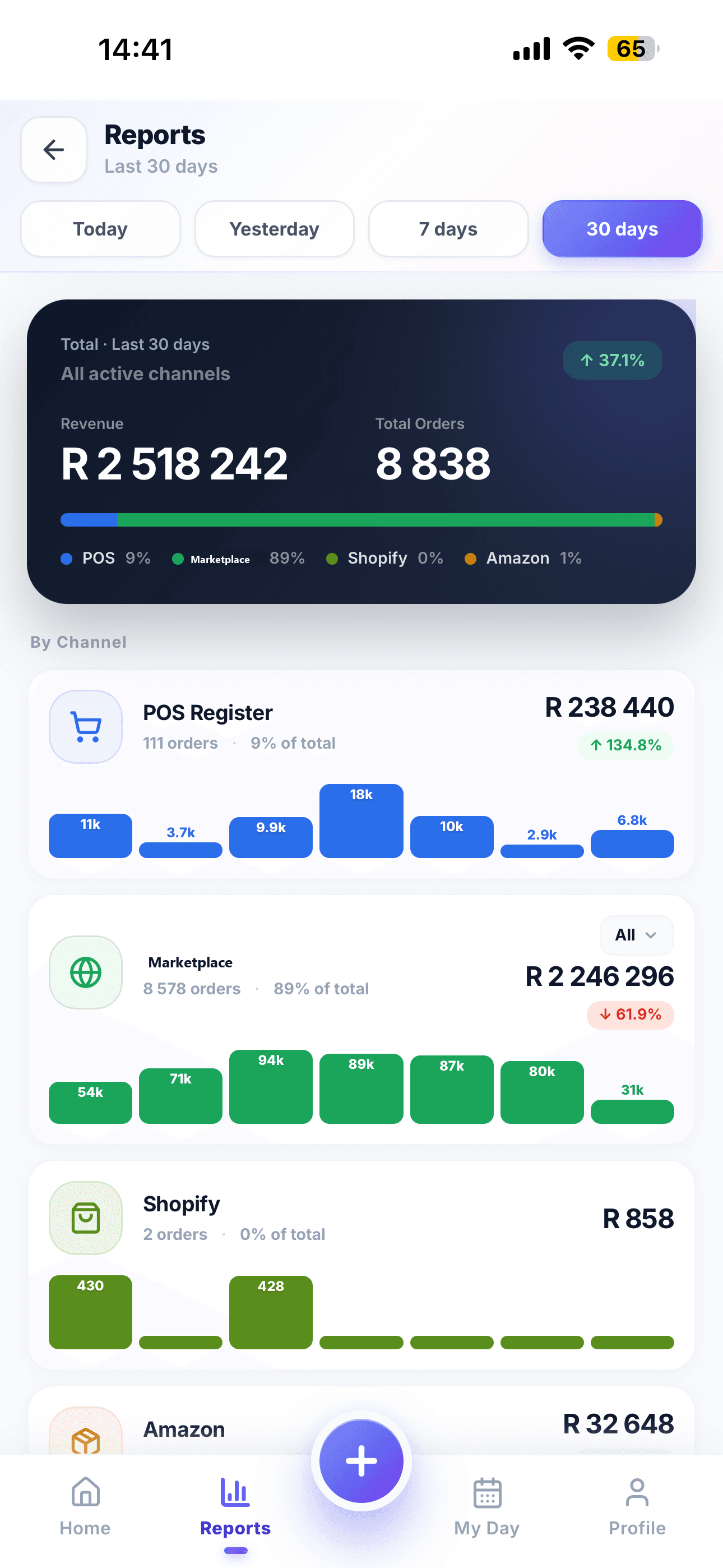
Every channel on one screen
Thirty days of revenue and orders, broken down by the till and each connected channel, with a daily bar chart under every one.
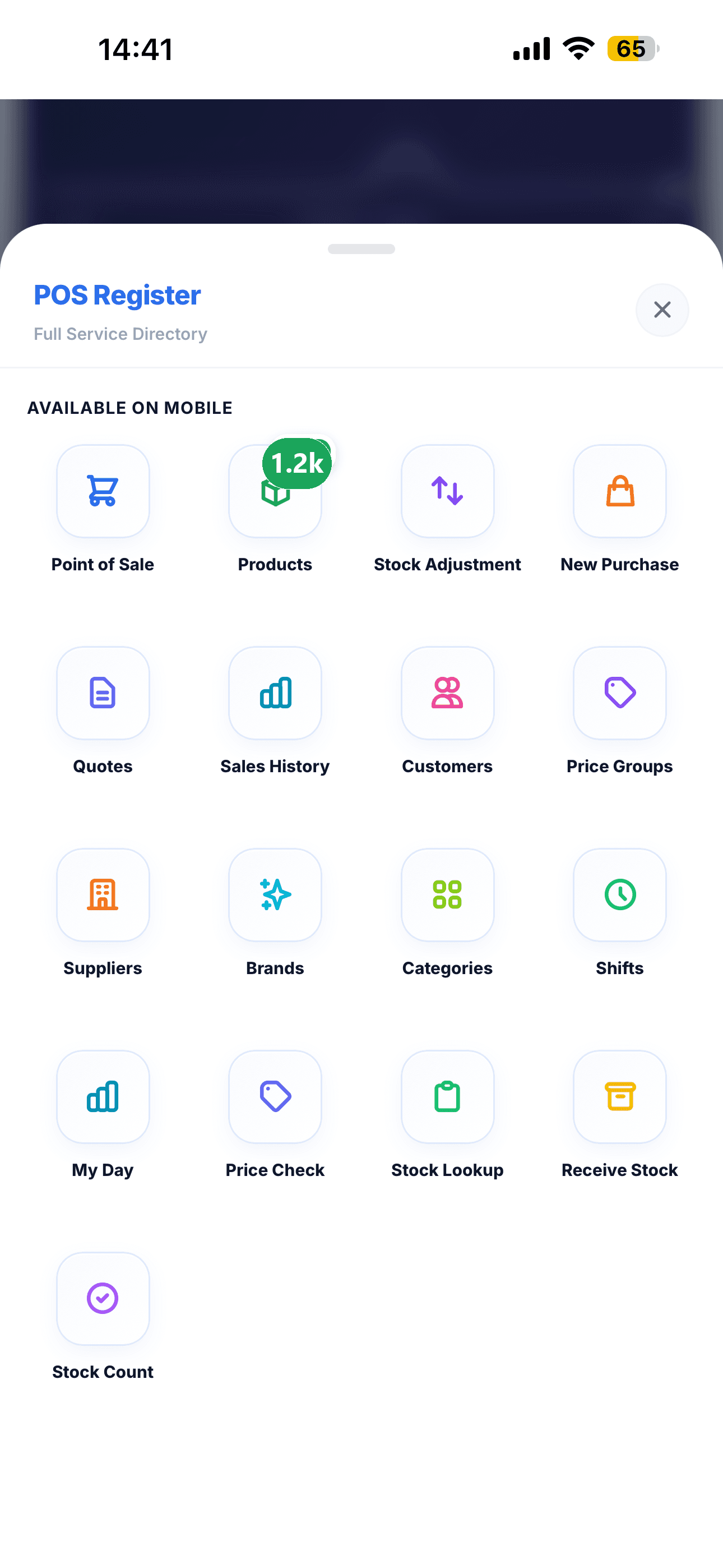
The whole system, not a cut-down one
Point of sale, purchases, quotes, customers, suppliers, shifts, stock counts and receiving — the same tools as the shop computer, laid out for a thumb.
The same web address and the same login you use on the shop computer
Scan a barcode with the phone camera, straight from the browser
Ring up a sale, receive stock or run a stock count away from the counter
Works on any current phone, iPhone or Android, with nothing to install
Perfect for Freelancers & Service Businesses
Don't need a full POS? Use Online POS free forever to send professional quotes, invoices, and pro forma invoices. Up to 100 products — no credit card, no time limit.
Plumbers & Electricians
Quote a job, send a professional invoice, track payment status.
Freelance Developers & Designers
Track projects as products, generate invoices with line items, export PDF.
Tutors & Consultants
Bill per session, send quotes in advance, manage client history.
Small Contractors & Builders
Manage material costs, create purchase orders, quote clients professionally.
What You Get — Free
The Parts That Save You a Day a Week
The unglamorous jobs behind a shop — labelling, receiving, counting, cashing up — handled in the same place you sell.
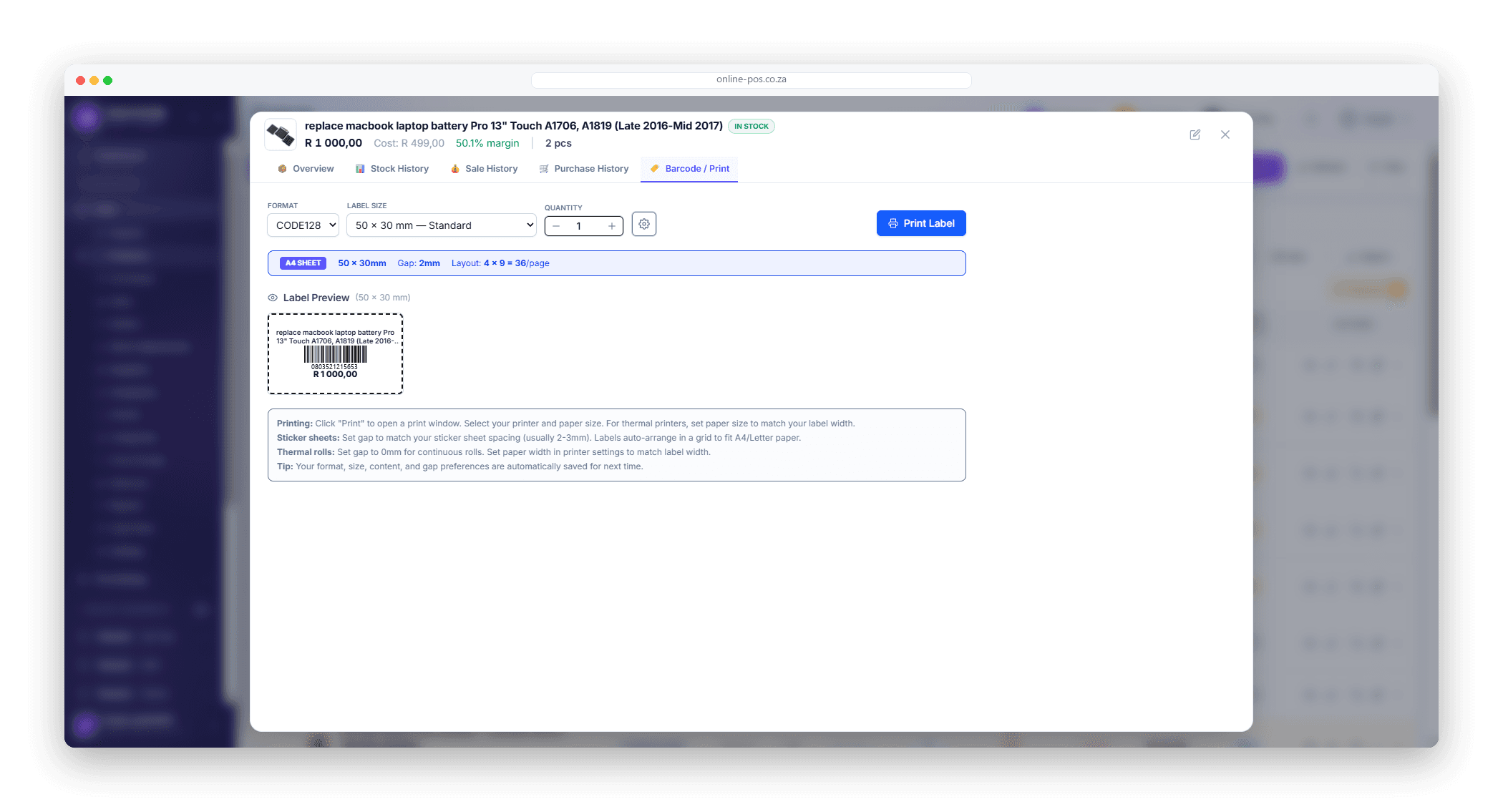
Feature
Barcode & Label Printing
Print barcodes for any product — one label or a whole delivery at once
Label sizes for shelf edges, price tags and product stickers
Generate a barcode for stock that arrived without one
Feature
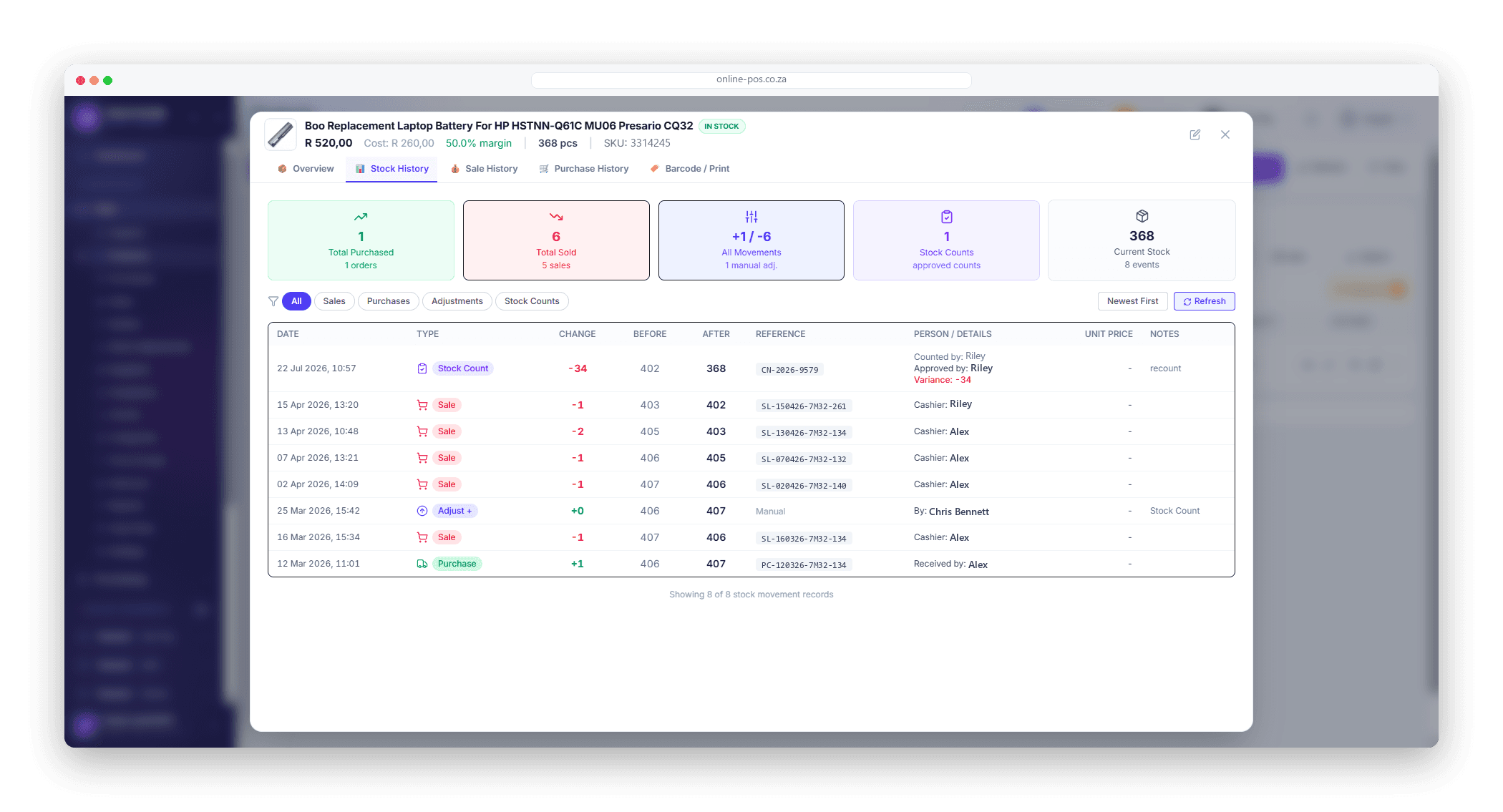
Stock Movement Tracking
A full audit trail of every stock change — who, when, and why
Sales, returns, adjustments, transfers and deliveries all in one history
Trace a wrong figure back to the movement that caused it
Purchase orders & suppliers
Raise an order against a supplier, receive the stock in against it when the delivery lands, and keep the cost price up to date automatically. Part-payments are tracked, so you always know what is still owed on each order.
Stock counts your staff can run
Assign a count to a team member and they work through it on their phone, scanning as they go. You see the variance against the system figure and approve it — line by line if you want — before a single stock number changes.
Team accounts with real permissions
Give each person their own login and switch features on or off per user. A cashier can sell without ever seeing cost prices, margins or supplier terms, and every sale, adjustment and count is stamped with who did it.
Shifts & cash-up
Open a shift when the till starts and close it at the end of the day against what is actually in the drawer. Cash movements in and out are logged, so a short till is a question you can answer instead of a mystery.
Questions People Ask Before Signing Up
What the system is, what you need to run it, and how it fits the way you already sell.
What is Online POS?
Online POS is a South African point-of-sale and e-commerce platform that runs in a web browser. It handles the till in your shop, your products and stock, purchases from suppliers, quotes and invoices, customers, staff and reporting — and it connects the same catalogue to your own online store and to marketplaces like Takealot and Shopify. You pay a monthly subscription and sign in at a web address; there is nothing to install.
Do I need to install anything on my computer?
No. Online POS is a hosted service you open in any current web browser — Chrome, Edge, Safari or Firefox — on Windows, macOS, a tablet or a phone. There is no setup file, no download and no version to keep up to date: improvements go live on our side and you get them the next time you load the page.
Is Online POS a cloud-based POS?
Yes. Online POS is a cloud-based POS — software as a service (SaaS) — so the system and your data live securely online and you sign in from any web browser. Your till, stock and reports stay in sync across every device, and on a phone or tablet the same login works as an mPOS (mobile point of sale), so you can take a sale away from the counter with nothing to install.
What hardware do I need to get started?
Anything that runs a browser and connects to the internet — a laptop, a desktop, a tablet or a phone. A barcode scanner helps but is not required: a USB scanner works out of the box, and on a phone the camera can scan barcodes straight from the browser. Add a receipt printer and a cash drawer if you want printed slips at the counter.
Can I sell in my shop and online at the same time?
Yes — that is the point of it. There is one catalogue behind everything. A product you add at the till appears on your online store, and a sale taken anywhere reduces the same stock figure, so the shop and the website cannot quietly oversell the same item.
Which sales channels can I connect?
Your own branded online store is included. Takealot, Shopify and WooCommerce connect as paid add-ons that sync products, stock and orders both ways, and Takealot adds automated competitor price monitoring and repricing. Amazon Seller Central support is in progress. You can run several accounts on the same channel — three Shopify stores, for example — from one login.
Can my staff have their own logins?
Yes. Each team member gets their own account with permissions you control, so a cashier can ring up sales without seeing your costs, margins or supplier pricing. Sales, stock adjustments and stock counts are all recorded against the person who did them.
How do I get my existing products in?
Import them from an Excel or CSV file in bulk — names, barcodes, prices, cost, stock, categories and suppliers. You can export the same way at any time, so your catalogue and your sales history are always yours to take with you.
Is it built for South Africa?
It is. Prices, reports and invoices are in Rand, VAT is handled on sales, card payments on your online store run through PayFast, and the marketplace integrations are built around Takealot. Support is South African and answers in South African business hours.
Still deciding? See what each plan costs or ask us directly.
Simple, Transparent Pricing
Start free. Upgrade when you need more.
POS Free
Perfect for getting started
POS Pro
For growing businesses
Takealot Integration
Auto-pricing & sync
START MANAGING
YOUR BUSINESS TODAY.
Scale your retail operations with South Africa's most powerful multi-channel platform. Sync stores, track sales, and grow everywhere.